Bank Offer Not Applying? 8 Reasons and How Offers Stack
You tap "Apply offer", the bank discount you saw on the product page vanishes, and the payable amount is exactly what it was before. With Flipkart's Big Bang Diwali Sale announced to start on 28 October and the festive sales already running across other stores, this is the week it happens to a lot of shoppers (Business Today, 27 Oct 2026).
The short answer: a bank offer is not tied to the product, it is tied to the payment. It appears on the payment step only when the exact card, card type, payment route, order value and date window all match the offer's conditions, and the discount has not already been used up. Change any one of those and the offer disappears. Almost every "bank offer not working" case is one of the eight mismatches below.
What is being advertised this week
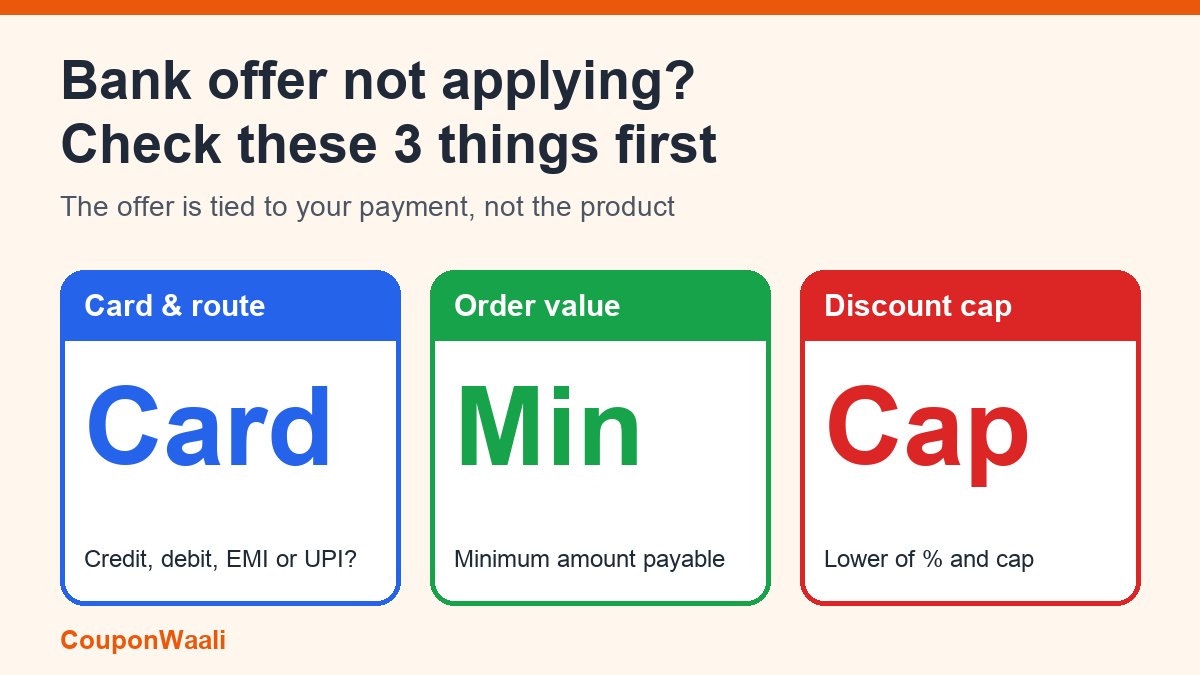
Flipkart's sale preview highlights an instant discount of 10% for SBI cards. Business Today's guide to the sale tells shoppers to check three things before counting on it: the eligible card or EMI option, the minimum spend and the discount cap, and to treat "the final checkout amount" as the only fair comparison (Business Today). News18 reports the same SBI offer in its sale preview (News18, 27 Oct 2026). The exact conditions are published by the bank and the store for each sale, so read the terms linked on the offer itself, not a news summary, before you rely on a number.
8 reasons a bank offer does not apply
1. Wrong card type or payment route
An offer for "credit cards" will not show for a debit card, and an offer for EMI transactions will not show if you pay in full. Some offers cover only one bank's cards, and some only one network. Check whether the offer says debit, credit, EMI or UPI before you pick the payment method.
2. Minimum order value not reached
Most offers need a minimum cart value, and it is usually measured on the amount payable, not on the price before other discounts. If a coupon or exchange value pulls the total below the threshold, the bank offer can drop off the payment page. Look at the minimum in the terms and compare it with the amount you will actually pay.
3. The discount cap makes it smaller than you think
"10% instant discount" almost always comes with a maximum rupee amount per transaction. On a ₹20,000 order, 10% would be ₹2,000, but if the cap is lower, you get only the capped amount. The offer has not failed; the percentage was just never the whole story. Work out the real saving as the lower of the percentage amount and the cap.
4. Per-card or per-user limit already used
Many offers can be used once per card, once per account, or a limited number of times during the sale. If you used the same card earlier in the sale, the offer may simply be gone for you.
5. Offer window or daily quota is over
Sale previews describe hourly deals and evening offer windows (Business Today). A bank offer can be limited to certain hours, certain days or a total budget. When the budget is used up, the offer is switched off even though the banner may still be on the page.
6. The product or seller is excluded
Offers often exclude some categories, brands or third-party sellers. A banner on the home page does not mean it covers the exact model, storage size and seller you chose. Open the offer details from the product page, not the sale page.
7. Cart changes after the offer was shown
Changing quantity, removing an item, adding an exchange or switching delivery option can re-price the order. After any change, go back to the payment step and check whether the offer is still listed.
8. Saved card or app problems
If your card is saved on the app, the store identifies its bank from the card's first digits. A card issued by a different bank, or an old saved card, may not match the offer you expected. Try the payment page again with the correct card, refresh the app, or complete checkout on the website. If the offer is shown for the card but fails at the bank page, contact the bank's customer care and keep the order number.
Can you use a coupon and a bank offer together?
Often yes, but not always. A coupon normally changes the price of the order and is applied at the cart or before payment. A bank offer changes the price of the payment and is applied at the last step. Because they act at different points, many stores let you use both. The usual exceptions are:
- the coupon's terms say "cannot be combined with other offers";
- the coupon is meant for specific sellers or categories that the bank offer excludes;
- the bank offer's minimum value is no longer met after the coupon is applied.
What stacks in practice is usually a store coupon, one bank offer, and an exchange value together. Two bank offers on the same order generally do not stack: the checkout lets you pick one. If a coupon itself is being rejected, the reasons are different and covered in our guide to coupon codes that do not work.
Which offer type should you pick?
When more than one payment offer is shown, they are not equal. An instant discount lowers what you pay now; cashback arrives later, often as a credit; and no-cost EMI can hide fees. We compared the three in Instant Discount vs Cashback vs No-Cost EMI Explained. And whichever you pick, make sure the starting price was a real one: our check for fake discounts takes five minutes.
A 60-second checklist before you pay
- Open the offer's terms from the product page and note the card type, minimum order, cap and dates.
- Work out the real saving: the lower of the percentage and the cap.
- Select the matching card or payment route first, then look at the payable amount.
- If the offer is missing, check each of the eight reasons above in order. Most take under a minute.
- Screenshot the offer, the payment page and the amount payable. If the discount was shown and then not given, you will need these.
If the offer was shown but not given
If the offer was clearly displayed, you met its conditions and the discount did not arrive, raise the issue first with the store through its help section, with your order ID and screenshots. If a bank-side discount or cashback is missing, contact the bank too. Unresolved complaints against e-commerce companies can go to the National Consumer Helpline (1915).
FAQ
Why does the bank offer show on the product page but not at payment?
The product page shows every offer the store is running. The payment page shows only the offers that match your card, payment route and cart value right now. If it is missing there, one of the conditions is not met.
Can I use two bank offers on one order?
Usually no. Checkouts normally let you apply one bank offer per payment. You may be able to combine a store coupon with one bank offer if the terms allow.
Is the bank offer refunded if I return the product?
Typically the refund follows the amount you actually paid, so an instant discount is not refunded separately, and cashback may be reversed. Check the offer's return clause before buying something you might send back.
Is it safe to share my card details on a page that promises a bigger bank discount?
Only enter card details on the store's own checkout or your bank's page. Never share an OTP, PIN or CVV with anyone who says it will "unlock" an offer.
Sources: Business Today: Flipkart Big Bang Diwali Sale starts October 28: The phones, bank offers and deal details shoppers should check, 27 October 2026; News18: Flipkart Big Bang Diwali Sale Begins October 28, 27 October 2026. Offer terms change during a sale, so always check the live offer details and your bank's terms. More guides on the CouponWaali blog; how we work: About CouponWaali and our disclaimer.